
Benefits of Clone Offering
- Saves time by eliminating the need to recreate offering details from scratch.
- Reduces manual data entry by automatically copying key offering information and configurations.
- Maintains consistency across similar offerings and investment opportunities.
- Minimizes setup errors by reusing proven configurations and templates.
- Accelerates offering launches by streamlining the setup process for new capital raises.
Steps to Clone an Offering
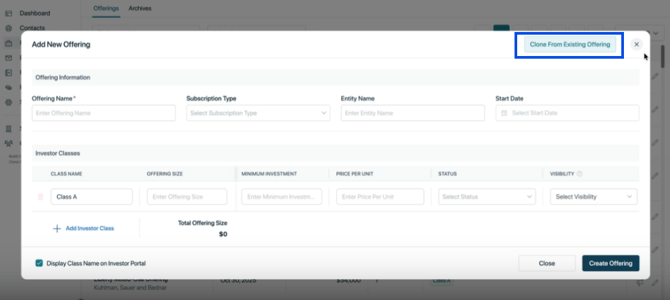
- Navigate to Portfolio and click Add New Offering.
- In the Create Offering wizard, click Clone Existing Offering.
- Search for and select the existing offering you would like to clone.
- Click Clone Offering.
⚡ When an offering is cloned, the new offering is automatically named "Copy of [Original Offering Name]". Be sure to rename the cloned offering to the appropriate offering name before publishing it
A new offering will be created as a copy of the selected offering. By default, the cloned offering and its investor classes will be created in Draft status. You can then update the offering name, review the copied information, and make any necessary changes before changing the status to Accepting Investments or Reservations and making the offering live.
What Gets Cloned?
When an offering is cloned, the following information is copied from the original offering:
- Offering details and Investor classes
- Gallery images
- Summary and offering content
- Key highlights
- Investor classes (created in Draft status)
- Documents and assets
- Funding instructions
- Visibility and public offering settings
- E-sign templates
- Investor return metric settings and other offering-level configurations
What Does NOT Get Cloned?
The Clone Offering feature is designed to help sponsors quickly create a new capital raise by reusing the setup and configuration of an existing offering. As a result, only offering-related information is copied.
The following information is NOT cloned:
- Investor records
- Signed subscription agreements
- Property or offering updates
- Capital calls
- Distribution history
- Cap table data
- Waterfall calculations
- NAV values and history
- Any other historical financial or transactional data
All investor activity, financial records, and historical data remain associated with the original offering and are not carried over to the cloned offering.
This ensures that the cloned offering starts as a clean draft while retaining the setup and content needed to launch a new offering efficiently.
Important points to remember
Points to Remember
- The cloned offering inherits most settings and content from the original offering. Be sure to review the offering details, funding instructions, investor classes, and e-sign templates before making the offering live.
- Only Platform owner and company users with the appropriate Offering permissions can create or clone offerings.
👤 For questions or help with the process, email us at success@sponsorcloud.io or Schedule a meeting. An experienced Customer Success Manager will reach out to assist you.