
Sending Offering Updates with Account Statements in SponsorCloud
With our Investor Platform, you can send Offering Updates to investors directly by creating customized email templates and attaching relevant documents.
These updates help you:
-
Keep investors informed with timely communications
-
Share auto-generated, accurate account statements
-
Maintain transparency throughout the investment lifecycle
To learn more about sharing Offering Updates with investors, please [click here].
In this article, we will specifically cover how to include account statements as part of an Offering Update and customize them.
Step-by-Step Guide: Attach and Customize Account Statements in an Offering Update
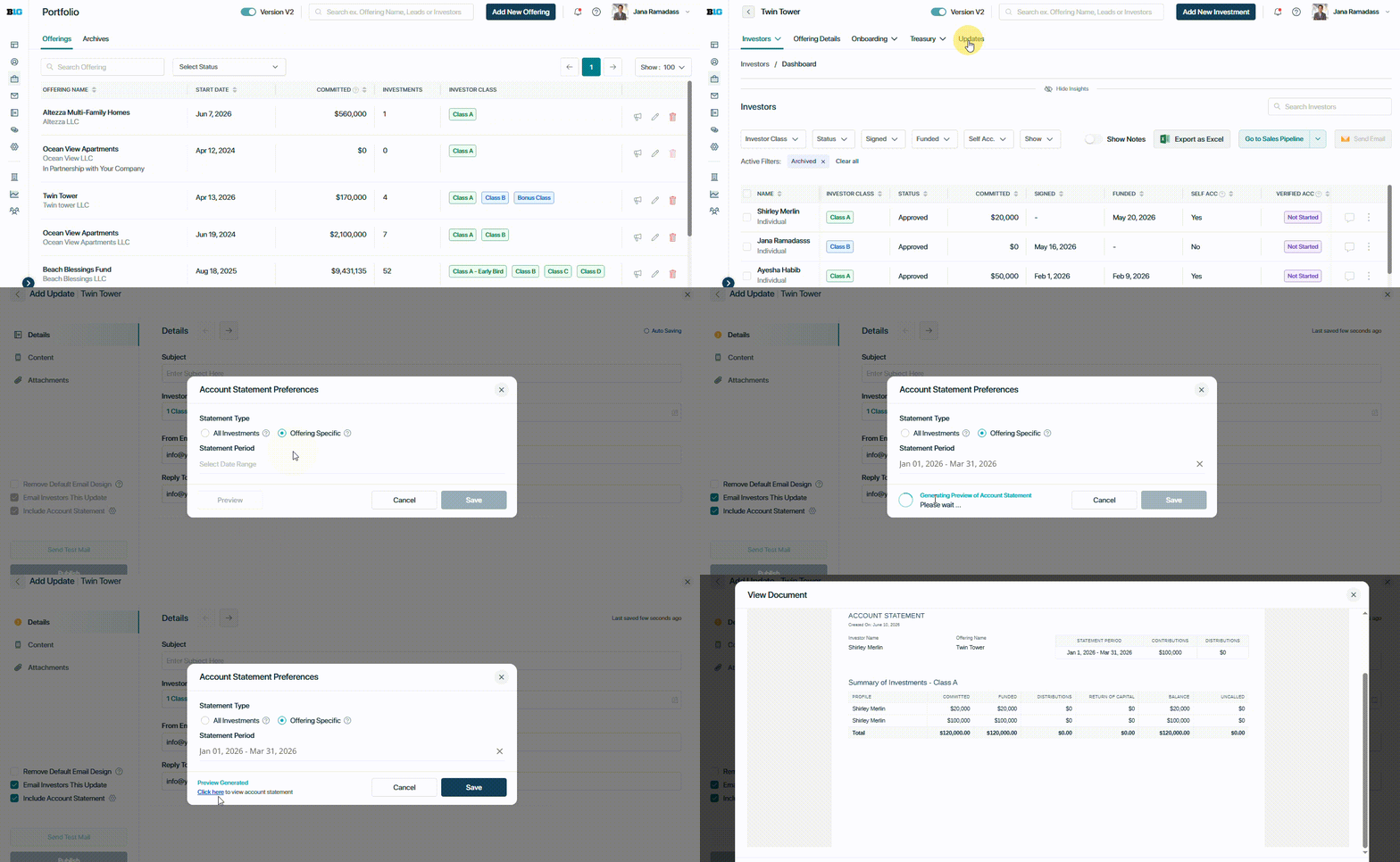
Step 1: Navigate to Offering Updates
Go to:
Portfolio → Select the Offering → Updates → Click “Add Update”
Step 2: Create the Update
-
Fill in the recipeint details
-
Add Content and attach relevant documents
-
Check the box labeled “Include Account Statement”
Step 3: Select the Statement Type
You can choose from the following options:
1. All Investments
This statement is formatted to provide investors with information on all of their investments across all offerings on the platform.
2. Offering-Specific
This statement is ideal for Offering Updates, as it includes only the investor’s investment(s) related to the selected offering.
Step 4: Select the Statement Period
Choose the date range for the account statement from the available options, including Last Month, Last Quarter, Last 6 Months, Last 9 Months, Last Year, or a Custom Date Range.
Once a date range is selected, you can preview the account statement before sending the update to investors.
Step 5: Send the Update
When the email is sent:
-
Each investor receives the "update" email
-
The account statement is automatically generated and attached
-
Investors only see their own personalized statement, ensuring data accuracy and privacy
👤 For questions or help with the process, email us at success@sponsorcloud.io or Schedule a meeting. An experienced Customer Success Manager will reach out to assist you.