
Track Investor Engagement with Offering Insights
Sponsors can now easily track investor engagement on their offering landing pages.
Each offering includes a dedicated landing page that investors can access after logging into the platform to explore the opportunity in detail.
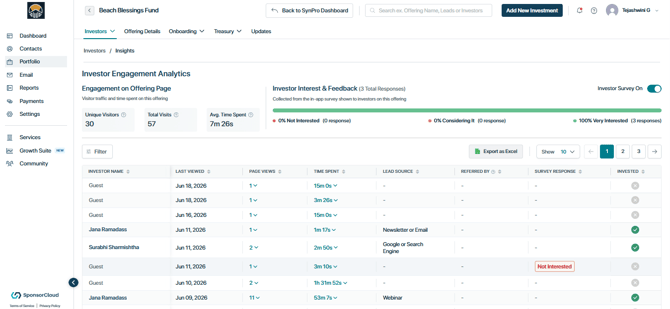
With Offering Insights, sponsors gain visibility into how investors interact with these pages, including:
- Number of views / Last viewed
- Time spent on the page
- Overall engagement duration
Higher time spent is often a strong indicator of increased interest and a higher likelihood of conversion. With access to this real-time data, sponsors can engage investors at the right moment when interest is at its peak and improve conversion outcomes.
In addition, investors are prompted with a feedback survey while interacting with the page, allowing them to share their level of interest and intent.
Together, behavioral engagement data and direct investor feedback provide powerful insights into investor sentiment. This enables sponsors and investor relations teams to:
- Better understand investor interest
- Prioritize outreach effectively
- Improve overall conversion rates
Where to Access Offering Insights
Navigate to:
Portfolio → Select Offering → Insights
Understanding Landing Page Insights
If the public offering page (accessible via Portfolio → Offering → Offering Details) is shared with potential investors:
- Guest Visitors (Before Login):
When a prospective investor visits the landing page without logging in, their activity is tracked as a guest visit. You can view metrics such as Date/time of visit, visit count, duration of visits visits. - Registered Investors (After Login):
Once an investor signs up and logs in, the platform provides more granular insights, including:
It also shows exactly which investors viewed the page, along with key engagement metrics, and Include separate columns indicating whether the investor has reserved and invested in the deal.
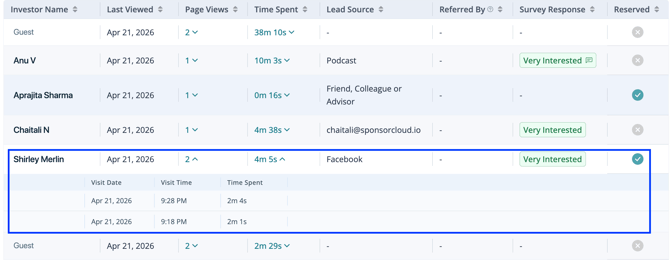
By expanding the page views or time spent section, you can view individual visit dates and times along with the duration of each visit.
Investor Feedback Survey
All new offerings are automatically enabled with the investor feedback survey. Sponsors have the flexibility to turn this feature off at any time.
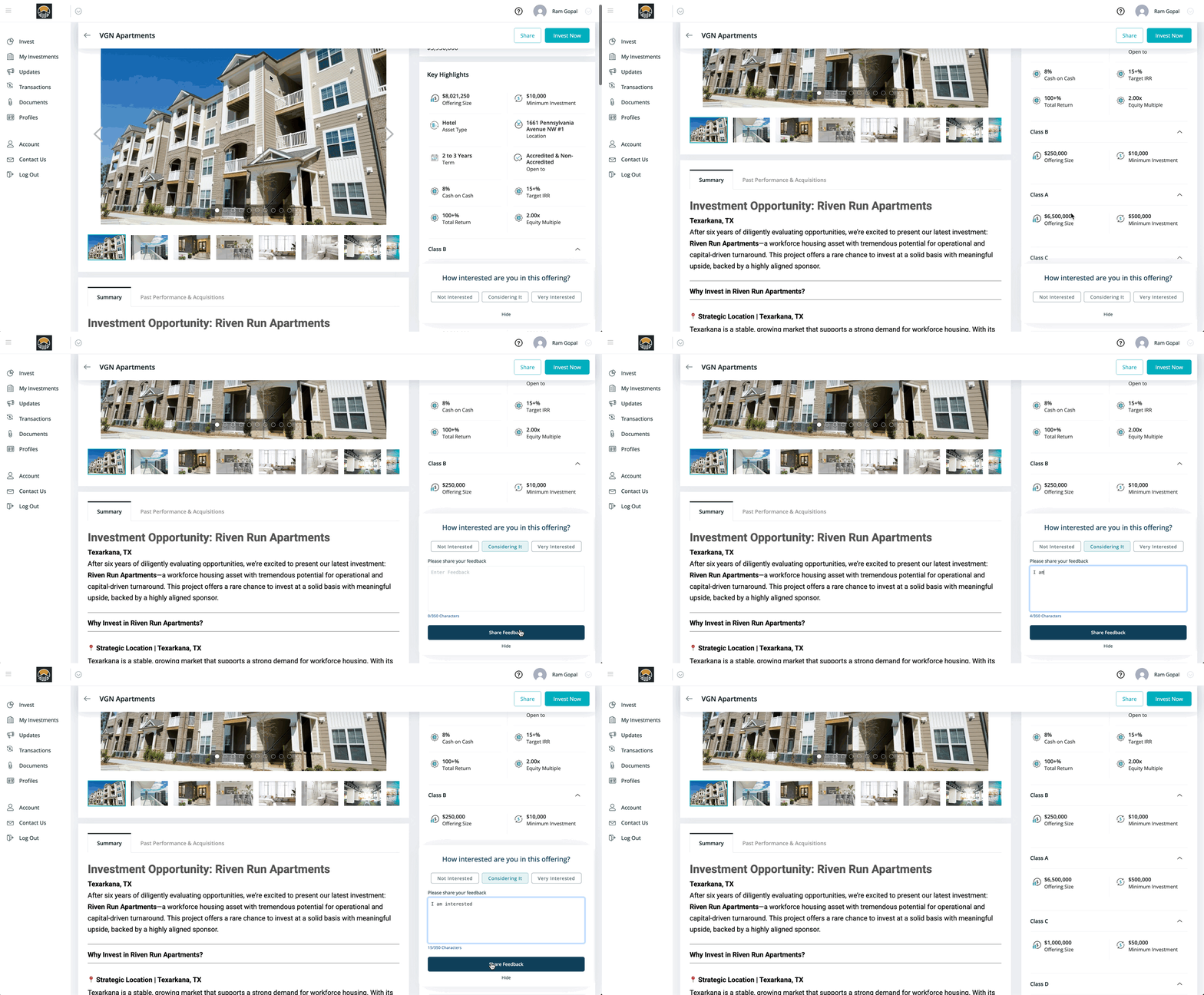
When a potential investor views an offering, they are prompted with a pop-up survey where they can indicate their level of interest:
- Not Interested
- Considering It
- Very Interested
Investors can also provide optional written feedback to share additional context.
Once the survey is submitted:
- Sponsors receive an email notification
- All responses are recorded under the Insights tab for that specific offering
This creates a centralized view of investor sentiment, including:
- Visual charts for quick analysis
- A sortable table of responses
- CSV export functionality for deeper analysis
Together, these insights help sponsors better understand investor intent, prioritize follow-ups, and make more informed decisions to drive conversions.
Key Advantages:
- Understand early sentiment: See what drives investor interest and optimize your deal for better engagement.
- Prioritize outreach: Identify interested investors and focus your efforts for faster capital raising.
- Track engagement: Monitor responses instantly and understand your conversion rate—no guesswork.
How to Turn the Investor Feedback Survey ON or OFF
Step 1: Navigate to the offering
-
Go to Portfolio > [Select Offering] > Insights
Step 2: Use the toggle Investor Survey
-
Locate the Investor Feedback Survey toggle & Turn ON/OFF to enable or disable the survey
Note: Only the Lead Sponsor can control the toggle. Co-sponsors can view survey responses but cannot turn the survey ON or OFF.
Tracking Investor Survey Responses
Each offering includes a dedicated Insights tab that captures all investor feedback responses, including any written comments. You can also easily track whether investors who expressed interest ultimately made an investment
You can access the Insights tab by navigating to Portfolio > [Select Offering] > Insights.
👤 For questions or help with the process, email us at success@sponsorcloud.io or Schedule a meeting. An experienced Customer Success Manager will reach out to assist you.