
SponsorCloud enables you to distribute funds to investors via ACH & Check, either as a one-time payment or on a recurring schedule. To learn more about setting up your entity and bank account or to process payments through SponsorCloud, please click here.
If your entity and bank are already configured, you can schedule distributions to occur automatically, Every Month, Every 3 Months and Every 12 Months on a specific date.
Key Benefits
- Save Time: Schedule recurring payments directly within the distributions module for each deal, eliminating the need to manually process payments or notify investors.
- Reduce Errors: Investors can update their distribution preferences and bank details in real-time, while automated workflows ensure scheduled payments are executed accurately based on these preferences.
- Enhance Customer Service: Scheduled distributions ensure investors receive payments on time, every time, improving their experience and building trust. Automated notifications alert sponsors in advance, allowing them to confirm bank funds and providing the flexibility to pause or resume recurring distributions.
- Increase Transparency: Both your team and investors can track payments with real-time updates on status, including Initiated, Pending, and Settled for ACH payments, as well as Estimated Delivery Date and Date Delivered for checks.
- Smart Distribution Calculator: Our robust calculator handles distribution calculations based on funded percentage, ownership percentage, or complex waterfall structures. It eliminates manual calculations and allows you to schedule distributions.
Step-by-Step Guide — Schedule Recurring Distributions
Step 1: Navigate to Portfolio > The Offering > Distributions > Add Distribution > Recurring Distribution.
Step 2: Configure Recurrence Settings
-
Frequency of Distribution:
Choose whether distributions should recur Monthly, Quarterly, or Annually. -
Send On (Day of Month):
Select the specific day of the month when each recurring distribution should be processed. -
First Payment Date:
Choose the date on which the first scheduled distribution should run. -
Duration:
Select Never Ending or specify the Number of Payments the system should process.
Step 3: Complete Distribution Details & Review
Pay To:
Choose how you want to distribute funds — Multiple Investors, Single Investor, or Use Waterfall.
- Single Investor / Multiple Investors:
If the total distribution amount is the same each cycle, enter the total amount manually. The system will automatically split payouts to Investors based on funded percentage or ownership percentage. - Use Waterfall:
Select this option to let the system calculate payouts using your configured waterfall structure.
🗒️ The Use Waterfall option will only be available if a waterfall structure has already been set up for the deal. To learn more about setting up a waterfall, click here.
Review Distribution Split:
The system will display the calculated payout amounts for each investor. After reviewing, you may update individual amounts if needed. Once done, click Proceed.
Step 4: Final Review & Schedule
This page will show:
-
Each investor’s distribution amount & their Preferred payment method (ACH or Check)
-
Their bank information
-
A summary of the schedule, including frequency and start date
After reviewing:
-
Select the Payment Bank
-
Check/Un-check Send Notification (optional)
-
Click Schedule Recurring Distribution
An OTP will be sent for authentication to complete the setup.
Note: After the schedule is set, the platform will automatically notify sponsors three days prior to each recurring distribution. For a complete list of all sponsor notifications, please see the end of this document.
How to View and Manage Scheduled Recurring Distributions
If you ever need to review your scheduled distributions, whether they are past or upcoming, or want to disable or update the schedule or payment method, you can follow the steps below.
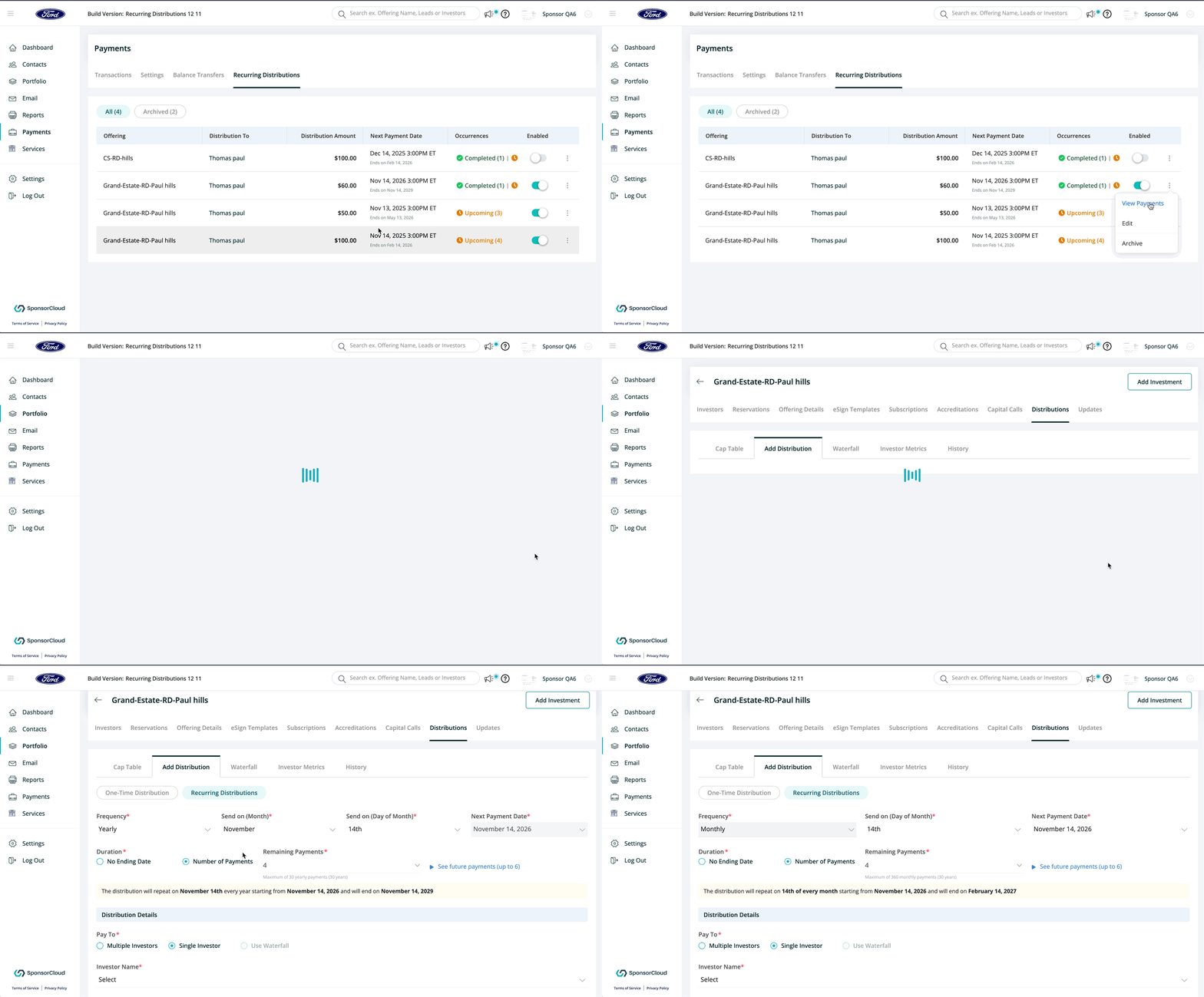
To Modify a Recurring Distribution
-
Go to Payments > Recurring Distributions
-
Click the three dots under the Actions column and Select Edit
You will be taken back to the setup page where you can update the frequency, amount, payment method, or any other details
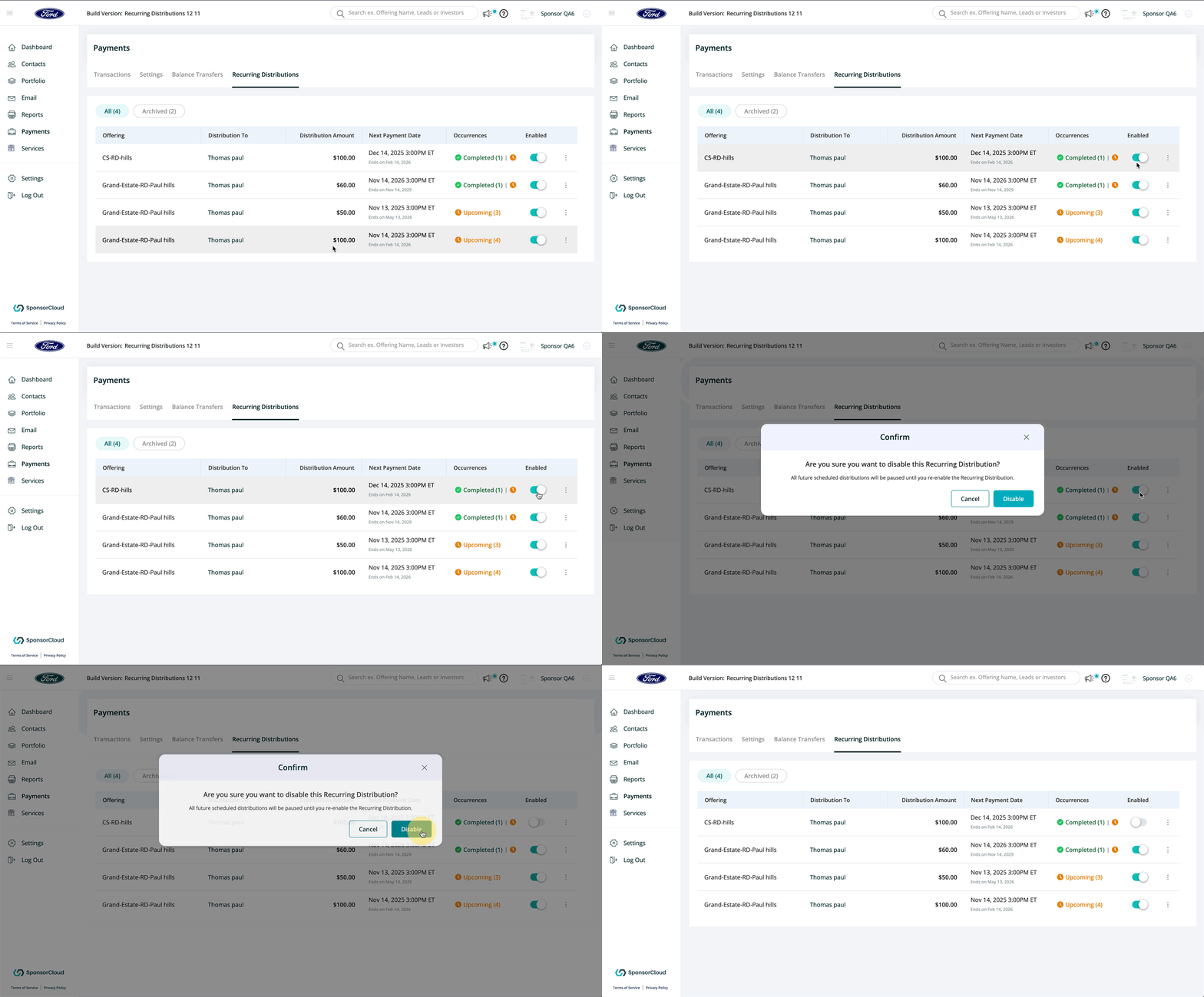
To Disable a Recurring Distribution
-
Go to Payments > Recurring Distributions
-
Use the Disable toggle next to the distribution you want to stop
You can re-enable it at any time using the same toggle
Sponsor Notifications for Recurring Distributions
- 3 Days Before Each Scheduled Distribution
Sponsors will receive a reminder to verify funds and review any details before the payment runs. - After a Successful Distribution
Sponsors will receive a confirmation once all payments have been processed successfully. - If a Payment Fails
Sponsors will be notified immediately with the reason for the failure so they can take action. - If a Recurring Distribution Is Auto-Disabled
Sponsors will receive an alert if Cap Table or Waterfall changes cause the recurring schedule to be disabled. - If a Payment Is Skipped
Sponsors will receive a notification explaining why the payment was skipped and any necessary next steps.
👤 For questions or help with the process, email us at success@sponsorcloud.io or Schedule a meeting. An experienced Customer Success Manager will reach out to assist you.